
Know if you'll graduate
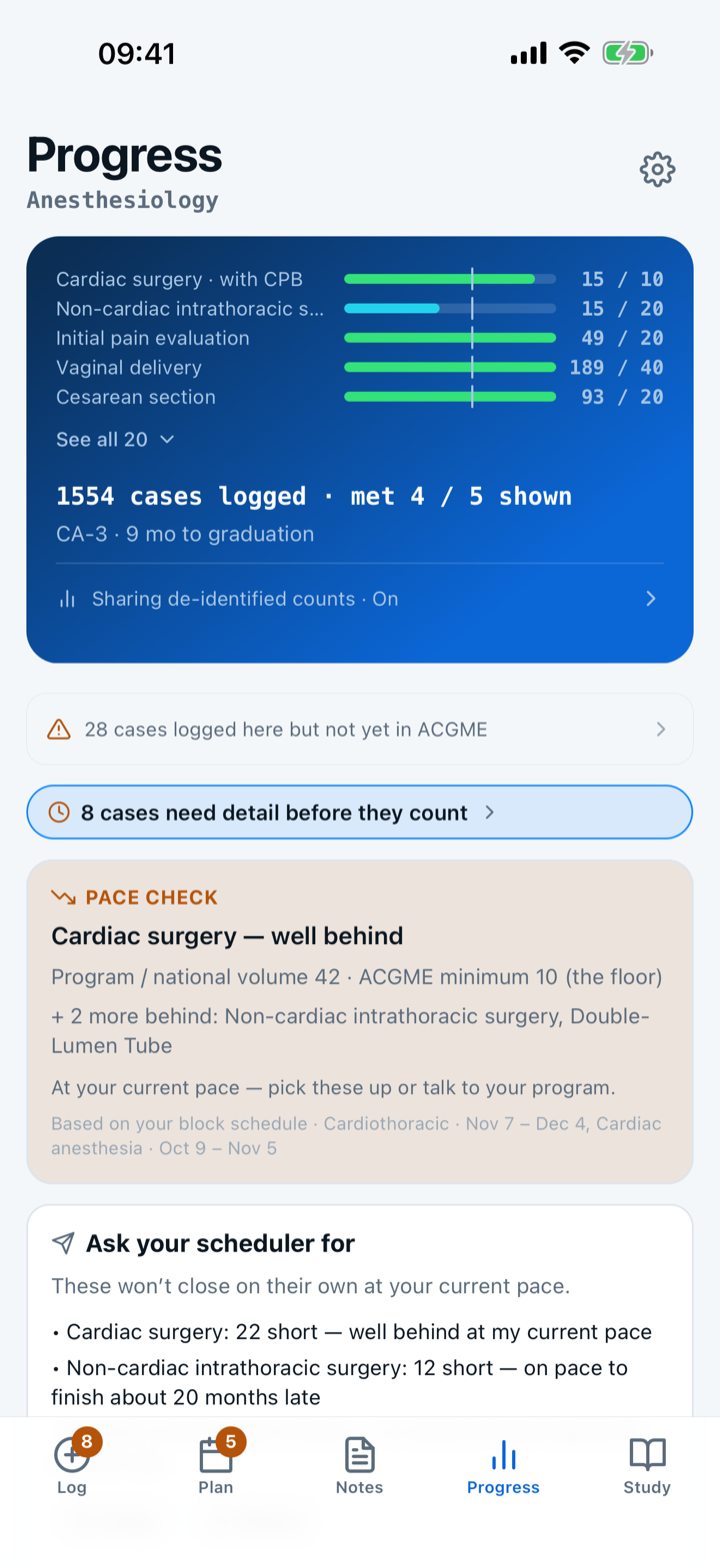
The Progress screen grades every category against the ACGME-required minimum, with the national-average volume beside it as context. Categories you are behind on sort to the top; met ones collapse away. Toggle between the whole residency and the current year, open a category for a forecast, and edit any target your program sets differently.
By Christopher Cutler, MD, CA-1, anesthesiology
Capnolog tracks two lines for every category, so “am I behind?” is a glance instead of a spreadsheet.
- 1
Two targets per category
The ACGME-required minimum is the bar your progress is graded against. The national-average volume sits beside it as context, not as a second requirement. The Progress screen — from Settings, or the header on the Log tab — shows both for every category.
- 2
Deficits surface first
Categories you're behind on sort to the top in red and amber, so you always see what to chase next. What's already met collapses out of the way.
- 3
Cumulative or this year
Switch between your whole residency and the current CA-year to see your pace either way.
- 4
Open a category to see the shape of it
Tapping a category shows both bars, a forecast of where the current pace lands you, and a button that starts a case in that category. The answer to “I am behind on this” is one tap from the number that told you.
- 5
Correct a target that does not match your program
Settings → Personal & training → “Edit category targets” gives every category two number fields, a reset per field, and a reset for the lot. A value you change is badged as differing from the official ACGME minimum, so an edited target can never quietly pass for the published one.
Reset drops your override and the published figure comes back. Nothing is lost by trying it.
- 6
Started mid-residency?
Import your starting totals from a prior ACGME export so your bars open where you actually are, not at zero.
- 7
Moving to a fellowship?
A fellowship counts against its own published ACGME minimum table, not your residency one. Choose your fellowship in Settings and Progress switches to that table; your residency cases stay on the device either way.

Keep reading
| Category | ACGME min. | Nat’l avg. |
|---|---|---|
| Patients <12 years | 100 | 159 |
| — of which <3 years | 20 | 68 |
| — of which <3 months | 5 | 11 |
| Initial pain evaluation | 20 | 69 |
| Vaginal delivery | 40 | 93 |
| Cesarean section | 20 | 57 |
| Cardiac surgery (total) | 20 | — |
| — of which with CPB | 10 | 42 |
| — of which without CPB | 10 | 15 |
| Major-vessel procedures | 20 | 53 |
| Non-cardiac intrathoracic surgery | 20 | 32 |
| Intracerebral procedures (incl. endovascular) | — | 41 |
| — of which open cranium | 20 | 35 |
| Epidural anesthetics/catheters (peri-op) | 40 | 118 |
| Life-threatening pathology | 20 | 4 |
| Procedures w/ spinal anesthetics (incl. C-sections) | 40 | 99 |
| Procedures w/ peripheral nerve blocks | 40 | 145 |
The national average, from the ACGME’s published report, is what graduating residents typically log. Both numbers come straight from the app.
Counting is nested and correct — a single peds-under-3-months case credits every pediatric line it belongs to at once.
More in records and submission
Sign in to the official ACGME Case Log in ADS; the Capnolog extension fills each case, and you review it and press Submit.
Log each case on your phone, then file the batch at a computer in one sitting.
Paste it, or open the PDF — you review what was read before anything is saved.
Three kinds of copy: the cases not yet sent, your whole record, and a PDF for credentialing.