
Record a complication, privately
On the case form, tap the Complications row and tap every event that applies. The list is for your own record and is never sent to the ACGME. Turn on “Also flag for M&M” to put the case on your M&M list. On “All cases,” the Complication filter finds these cases again.
By Christopher Cutler, MD, CA-1, anesthesiology
The cases you learn the most from are the ones that went sideways. A private record means the case is there when M&M comes around.
- 1
Tap the Complications row
The row sits under the main answers on the case form. An untouched row reads None.
- 2
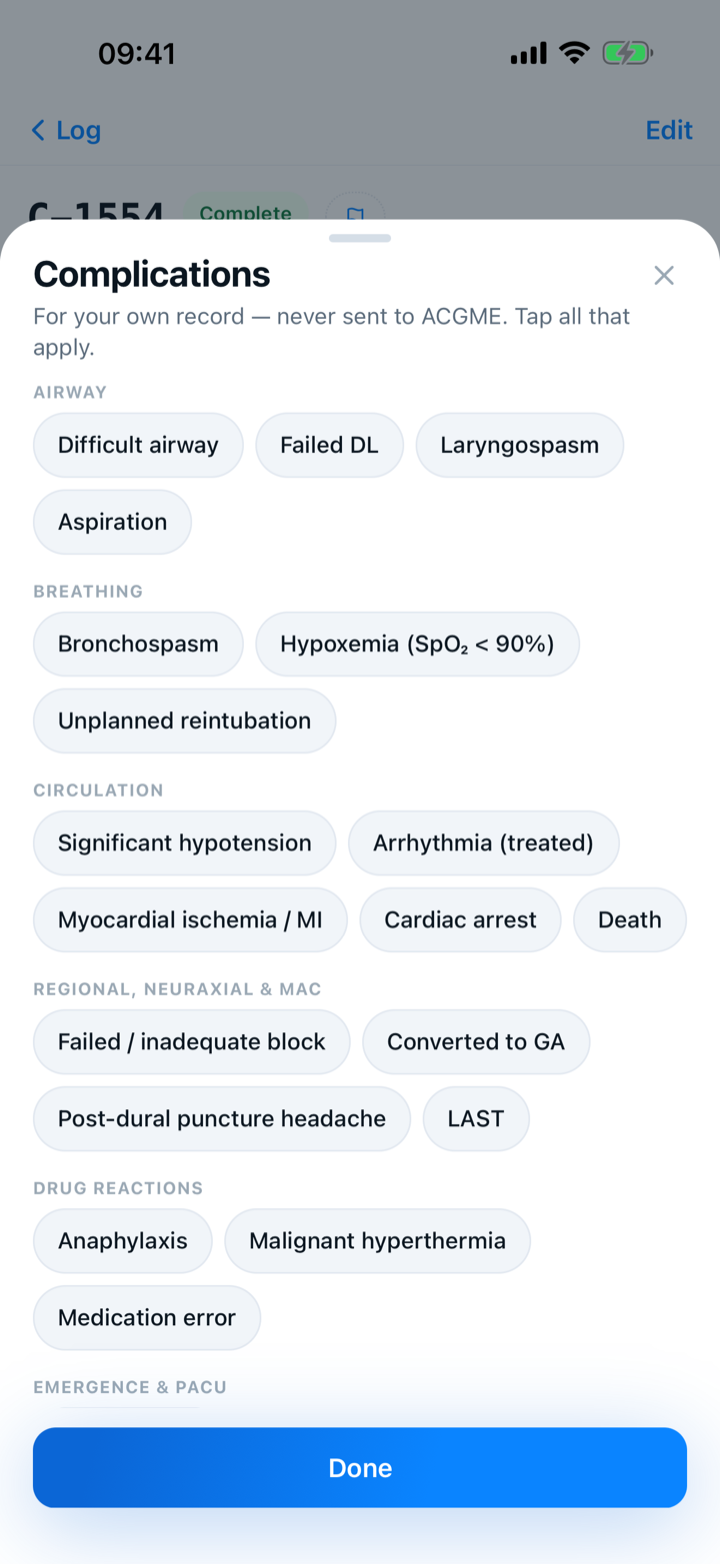
Tap every event that applies
The list of events is specific to your specialty. The line at the top says the list is for your own record and is never sent to the ACGME.
- 3
Use “Other” for anything not listed
“Other” takes a few words of your own. Keep them short and free of identifiers. That text never goes to the ACGME.
- 4
Turn on “Also flag for M&M”
The switch appears once you mark a complication. The case goes on your M&M list with a private note drawn from the events you marked. You can edit the note later.
- 5
Find these cases again
On the Log tab, tap “All cases” and tap the Complication filter.

Keep reading
A complication never enters the ACGME form, the case log export, or your totals.
More in day to day
Tap the answers or use a template, and never lose a case.
Set up tomorrow's OR board the night before — then log each case in one tap.
Share a case template or an attending note with your program, and use the ones your co-residents shared.
Hand off an anesthetic plan to a co-resident, or plan the case together with a senior on two phones.